API Gateway
Learn what an API Gateway is, how it works, its trade-offs, and exactly how to talk about it in a system design interview.
TL;DR
- An API Gateway is a single entry point that sits in front of all your backend services and handles every inbound client request.
- It centralises cross-cutting concerns — authentication, rate limiting, routing, and logging — so each service doesn't have to implement them separately.
- The main trade-off: it simplifies client logic dramatically, but it becomes a single point of failure and a potential performance bottleneck if not made highly available.
- Use it when you have 3+ microservices that clients need to reach; skip it for monoliths or internal service-to-service traffic.
The Problem It Solves
Every time you open a mobile app and see data from five different sources load in one shot — your profile, your feed, your notifications, your recommendations — an API Gateway almost certainly made that possible. Most developers never notice them precisely because they work so well.
Picture a mobile app that needs to show a user's home screen. To render it, the client must call the User Service (for profile data), the Feed Service (for posts), and the Notification Service (for the badge count). That's three round trips.
Now multiply: three different auth systems to satisfy, three different error response formats to parse, and three different rate limiters to stay under. Add a web client and a third-party integration and you have nine separate connections to manage — each with its own quirks.
The scaling problem
When you have 10 microservices and 3 client types, you're managing 30 potential connection contracts. Adding one new service means updating every client. That complexity compounds fast.
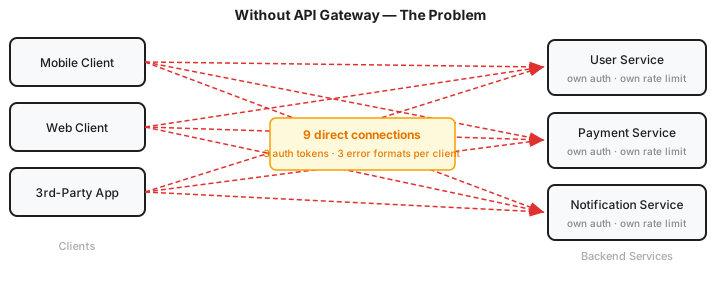
There had to be a better way. Enter the API Gateway.
What Is It?
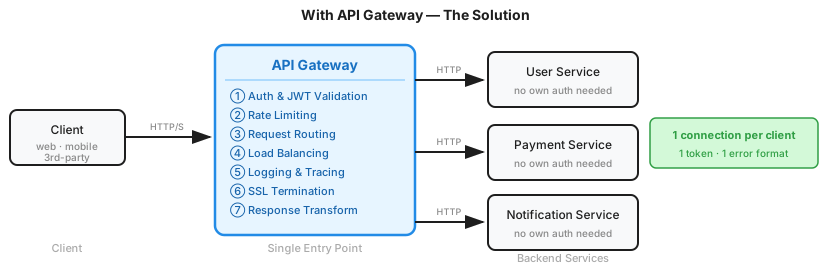
An API Gateway is a reverse proxy that acts as the single entry point for all client requests, routing them to the correct backend service while handling shared concerns — authentication, rate limiting, logging, SSL termination, and protocol translation.
Analogy: Think of it like a customs checkpoint at an international border. Every vehicle passes through exactly one booth — you don't drive straight to the warehouse, the freight office, or the inspection bay. The officer checks your documents (auth), confirms you haven't exceeded import limits (rate limiting), and directs you to the correct lane for your cargo type (routing). The checkpoint handles the bureaucracy so the facilities behind it can stay focused on their actual work.
Don't overthink it
An API Gateway is deliberately narrow in scope. It routes, it checks, it translates — and that's the whole job. You'll spend far more time designing your database schema or service boundaries than on this. The value is in having one component own the plumbing so every service behind it doesn't have to.
How It Works
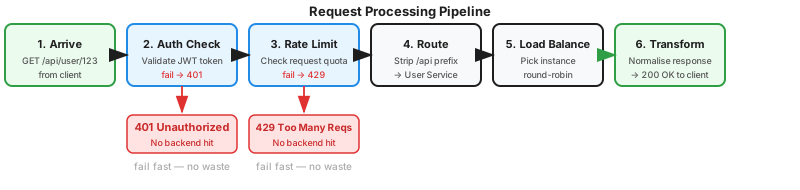
When a client sends GET /api/products/SKU-789, here's exactly what happens inside the gateway:
-
Request arrives — The gateway receives
GET /api/products/SKU-789from the client. Before anything else fires, it performs a basic structural check: is the URL path valid? Are the required headers present? Does the body (if any) conform to the declaredContent-Type? A malformed payload or missing required field gets a400 Bad Requestright here — no auth check, no backend hit. This is cheap to run and keeps garbage out of the rest of the pipeline. -
Auth Check — Validates the JWT token in the
Authorizationheader. Invalid or missing? Return401 Unauthorizedimmediately. No backend service is ever touched. This is one of the biggest wins — unauthenticated traffic is eliminated at the edge. -
Rate Limiting — Checks the client's request count against the quota (e.g., 1,000 requests/minute). Over the limit? Return
429 Too Many Requests. Again, no backend hit. -
Routing — Strips the
/apiprefix and maps the path to the correct service./api/products/SKU-789becomes a request to the Catalog Service. Routing is driven by a config table that maps paths, HTTP methods, and headers to upstream services:routes: - path: /products/* service: catalog-service port: 9001 - path: /cart/* service: cart-service port: 9002 - path: /checkout/* service: checkout-service port: 9003 -
Load Balancing — Picks one instance of the Catalog Service (e.g., round-robin across three running instances) to distribute load evenly.
-
Response Transformation — Translates the backend's response into whatever format the client expects. When backend services communicate internally over gRPC (for efficiency), the gateway handles the protocol conversion so clients always see clean JSON over HTTP:
// Client: GET /products/SKU-789  (HTTP/1.1 + JSON)

// Gateway translated to an internal gRPC call:
catalogService.getProduct({ sku: "SKU-789" })

// Gateway returned to client (JSON over HTTP):
{ "sku": "SKU-789", "name": "Wireless Headphones", "price": 79.99 }
Clients never need to know what protocol the backend uses — the gateway abstracts that boundary entirely.
-
Cache (optional) — If the response is non-user-specific and deterministic (the same request always returns the same result), the gateway can store it before returning to the client. The next identical request is served from cache — no backend service is touched at all. Common strategies: full-response caching with a TTL, or partial caching for the parts of a response that rarely change. Redis is the standard backing store for distributed cache here.
Why steps 2 and 3 matter so much
Because auth and rate limiting happen at the gateway, malicious or misconfigured clients are dropped before they consume any backend compute. At scale, this can prevent millions of wasted requests per day from reaching your services.
Key Components
Each of these is either a built-in module in managed gateways or a plugin in self-hosted ones:
| Component | What It Does |
|---|---|
| Router | Maps incoming paths/methods to the correct upstream service. Often uses a config file or service registry. |
| Auth Handler | Validates credentials (JWT, API key, OAuth token) and optionally enriches the request with user context. |
| Rate Limiter | Tracks request counts per client (or IP, or API key) and enforces quotas. Usually backed by Redis. |
| Load Balancer | Distributes requests across healthy instances of the target service. Often round-robin or least-connections. |
| Circuit Breaker | Stops sending requests to a failing downstream service, returning a fallback response instead (see Circuit Breaker pattern). |
| Request/Response Transformer | Modifies headers, rewrites paths, translates protocols (REST ↔ gRPC), or reshapes payloads. |
| Logger / Tracer | Emits a structured log and a distributed trace span for every request — the single best place for system-wide observability. |
| SSL Terminator | Handles TLS decryption so backend services communicate over plain HTTP internally, simplifying their configuration. |
Types of API Gateways
Not all gateways are the same. The three main categories:
| Type | Examples | Best For |
|---|---|---|
| Managed cloud gateway | AWS API Gateway, Azure API Management, GCP Apigee | Public-facing APIs, serverless backends, teams that want zero ops overhead |
| Self-hosted open-source | Kong, KrakenD, Traefik, NGINX Plus | Fine-grained control, on-prem deployments, cost-sensitive at scale |
| BFF (Backend for Frontend) | Custom Next.js API routes, GraphQL gateway | Client-specific aggregation — one gateway per surface (mobile BFF, web BFF) |
BFF pattern
A Backend for Frontend gateway is a specialised variant: instead of one universal gateway, each client type gets its own thin gateway that aggregates and reshapes data specifically for that client's needs. Netflix popularised this pattern for their diverse device ecosystem.
Popular API Gateways
Managed Cloud Services
Fully managed options that integrate tightly with their cloud ecosystem. Lowest ops overhead, but you pay a premium at scale and are locked into the provider.
AWS API Gateway
- Native integration with Lambda, ECS, and IAM
- Supports REST, HTTP, and WebSocket APIs out of the box
- Built-in request throttling, API key management, and CloudWatch metrics
- The default choice for serverless architectures on AWS
Azure API Management
- Policy engine lets you rewrite headers, validate request schemas, and mock responses entirely in config — no service code changes needed
- First-class support for enterprise identity protocols: OAuth 2.0, OIDC, and Active Directory integration out of the box
- Includes a hosted developer portal where consumers can browse docs, test endpoints, and generate API keys without a separate tool
Google Cloud Endpoints / Apigee
- Deep integration with GCP services and Cloud Run
- First-class gRPC support alongside REST
- Apigee (Google's enterprise tier) adds advanced analytics and monetisation features
Open-Source / Self-Hosted
Better control, no vendor lock-in, and significantly cheaper at high volume. You own the ops burden.
Kong
- Plugin-first architecture: nearly every capability (auth, rate limiting, request transformation, tracing) is a composable plugin rather than baked-in code
- Runs as a standalone gateway, a Kubernetes ingress controller, or a service mesh sidecar — adaptable to most deployment topologies
- Declarative config via
deck(GitOps-friendly) or a REST Admin API
KrakenD
- Stateless by design — no database dependency, no persistence layer
- Extremely high throughput; favoured for latency-sensitive workloads
- Declarative JSON/YAML config, no runtime scripting
Traefik
- Kubernetes-native with automatic service discovery via labels
- Automatic TLS certificate provisioning via Let's Encrypt
- Popular choice when you're already running on Kubernetes
What to say in an interview
You don't need to memorise every option. Pick one and justify the choice. A good answer sounds like: "I'd use AWS API Gateway here since we're already on AWS — it eliminates the ops overhead and plugs straight into Lambda and IAM with no configuration." That's more valuable than listing every gateway that exists.
Scaling an API Gateway
Horizontal Scaling
API Gateways are inherently stateless — they hold no session data themselves (rate limit counters and session tokens live in Redis). This makes them straightforward to scale: add more instances, put a load balancer in front, done.
There are actually two separate load balancing concerns at play:
| Layer | Who handles it | Example |
|---|---|---|
| Client → Gateway LB | A dedicated cloud load balancer in front of the gateway cluster | AWS ELB, Google Cloud LB, NGINX |
| Gateway → Service LB | The gateway itself, picking which instance of the target service to call | Round-robin, least-connections built into the gateway |
Interview shortcut: draw one box
In a system design interview you don't need to draw these as two separate components. A single box labelled "API Gateway / Load Balancer" is perfectly acceptable. The entry-point mechanics are almost never the interesting part of the design — don't spend your time here.
Global Distribution
For large-scale systems with users spread across multiple regions, you can push gateway instances closer to users — the same idea as a CDN edge node, but for API traffic:
- Regional deployments — Run gateway clusters in each geographic region (e.g., us-east, eu-west, ap-southeast).
- GeoDNS routing — Resolve the API domain to the nearest regional gateway based on the client's location. Reduces round-trip latency before the request even reaches your backend.
- Config synchronisation — Routing rules, rate limit policies, and auth config must stay consistent across all regional instances. Centralised config management (e.g., a control plane like Kong's) handles this.
Trade-offs
| Pros | Cons |
|---|---|
| Centralises cross-cutting concerns → services stay lean | Single point of failure — must be made highly available |
| Simplifies client code → one auth token, one error format | Adds one network hop → increases latency (typically 1–5ms) |
| Enables protocol translation (REST → gRPC, HTTP/1 → HTTP/2) | Can become a bottleneck under extreme write-heavy load |
| One place for observability: logs, metrics, traces | Adds operational complexity — another system to deploy and tune |
| Faster security response → block bad actors at the edge | Gateway config can become a sprawling blob of routing rules |
The fundamental tension here is simplicity vs. resilience. The gateway dramatically simplifies your architecture and client contracts, but you're concentrating risk in one component. The standard mitigation is running multiple gateway instances behind a Layer 4 load balancer, so no single instance failure takes down the system.
The gateway bottleneck trap
When a gateway handles auth, rate limiting, and heavy response transformation for millions of requests per second, it can become the system's CPU bottleneck. Profile before adding expensive per-request transformations.
When to Use It / When to Avoid It
Use an API Gateway when:
- You have 3+ microservices that external clients need to reach directly.
- You have multiple client types (mobile, web, third-party) with different data needs.
- You need centralised auth, rate limiting, or observability without duplicating logic in every service.
- You're exposing a public API and need developer portal features (API keys, docs, versioning).
Avoid an API Gateway when:
- You have a monolith — it adds latency with zero benefit.
- You're dealing with internal service-to-service traffic — use a service mesh (Istio, Linkerd) for east-west traffic instead; a gateway is designed for north-south traffic.
- Your team can't support the operational overhead of a distributed gateway cluster.
- You have a single backend with one client type — a reverse proxy like NGINX is sufficient.
Gateway vs. Service Mesh
A common interview trap: confusing gateways and service meshes. A gateway handles client-to-service (north-south) traffic. A service mesh handles service-to-service (east-west) traffic. You often use both together — not one instead of the other.
Real-World Examples
Netflix runs a purpose-built API gateway called Zuul (and its successor Zuul 2) that handles authentication, dynamic routing, and A/B test routing for over 200M subscribers. Netflix routes to different backend clusters based on the client device type — each gets a device-optimised response shape.
Uber uses an internal gateway to fan out a single rider-app request to multiple microservices (mapping, pricing, driver-matching) and aggregate their responses before returning them — a classic request aggregation use case.
AWS API Gateway + Lambda is the canonical serverless pattern: the gateway handles all HTTP concerns, rate limiting, and auth, leaving the Lambda function to contain pure business logic with zero HTTP boilerplate.
How This Shows Up in Interviews
When to bring it up
In any system design question involving multiple microservices, draw an API Gateway in your diagram within the first 5 minutes. It signals to the interviewer that you understand the client-to-service communication layer. Don't wait to be asked.
Don't get bogged down here
The API Gateway is not your most interesting design decision. A common interview mistake is spending five minutes explaining every middleware feature it could have. Instead, say: "I'll add an API Gateway to handle routing and basic middleware like auth and rate limiting" — and move on. Spending too much time here is far more likely to hurt you than not enough.
Depth expected at senior/staff level:
Don't just draw a box labelled "API Gateway." Talk through what it's doing:
- Which auth strategy? (JWT? OAuth2 with an introspection endpoint? mTLS for machine-to-machine?)
- What's your rate limiting strategy? Per-user or per-IP? What backing store? (Redis for distributed state.)
- How do you make the gateway itself highly available? (Multiple instances + a cloud load balancer in front. Gateway instances are stateless — sessions are in Redis, not memory.)
Common follow-up questions and strong answers:
| Interviewer asks | Strong answer |
|---|---|
| "What if the gateway goes down?" | "Multiple gateway instances behind a cloud NLB. Auto-scaling group with health checks. Stateless instances — all state (rate limit counters, sessions) is in Redis." |
| "How do you handle versioning?" | "Path-based (/v1/, /v2/) or header-based (API-Version: 2). The gateway routes by version prefix; old and new services co-exist." |
| "Would you use a gateway for internal traffic?" | "No — that's a service mesh. Gateway is north-south (client → service). Mesh is east-west (service → service). I'd use both." |
| "How do you avoid the gateway bottleneck?" | "Horizontal scaling + profile the gateway. Offload SSL to a CDN/L4 LB. Push heavy transforms to the services themselves if the gateway becomes the CPU bottleneck." |
The 'celebrity problem' equivalent
For write-heavy APIs, point out that the gateway can be offloaded. Don't authenticate every request in the gateway if requests are ultra-high-frequency and stateless — use signed request tokens (like AWS Signature V4) so services can self-validate without a round-trip to the gateway's auth service.
Quick Recap
- An API Gateway is a reverse proxy — the single entry point for all client-to-service communication.
- It centralises auth, rate limiting, routing, load balancing, and logging so services stay focused on business logic.
- Auth and rate limiting happen before any backend service is touched — this is the "fail fast at the edge" principle.
- It introduces a single point of failure; mitigate with multiple stateless instances behind a load balancer.
- Types: managed cloud (AWS API Gateway), self-hosted (Kong, KrakenD), and BFF (one per client surface).
- Use it for north-south (client → service) traffic; use a service mesh for east-west (service → service) traffic.
- In interviews: draw it early, explain what it's doing, and proactively address high availability and the bottleneck risk.
Related Concepts
- Load Balancing — The gateway often delegates load balancing decisions to a separate LB layer or uses an embedded algorithm.
- Rate Limiting — One of the most important gateway responsibilities; understanding token buckets and sliding windows helps you design the rate limiter inside the gateway.
- Service Mesh — The complementary pattern for east-west traffic that a gateway doesn't handle.
- Microservices — Gateways provide the most value in microservice architectures; understand why before designing one.
- Circuit Breaker — A pattern commonly implemented at the gateway layer to protect downstream services from cascading failures.